

Choose your Irohas lab, create your mail-in order, and pack the film with its order reference. Then post to the matching address with tracking. We send a payment link after receiving and checking your rolls.
Start your mail-in order, then use the steps below to prepare the parcel. You can choose Melbourne, Sydney or Perth. Keep the mail-in instructions open for the current addresses and order details.
What to have ready
- Your completed mail-in order and packing list, or the order number if you cannot print the list.
- A small rigid box or well-padded mailer, plus cushioning such as bubble wrap or clean, crumpled paper.
- Protective canisters for 35mm film if available, and a sealable bag for additional moisture protection.
- The address of the lab selected in your order, your return address, and a tracked postal service.
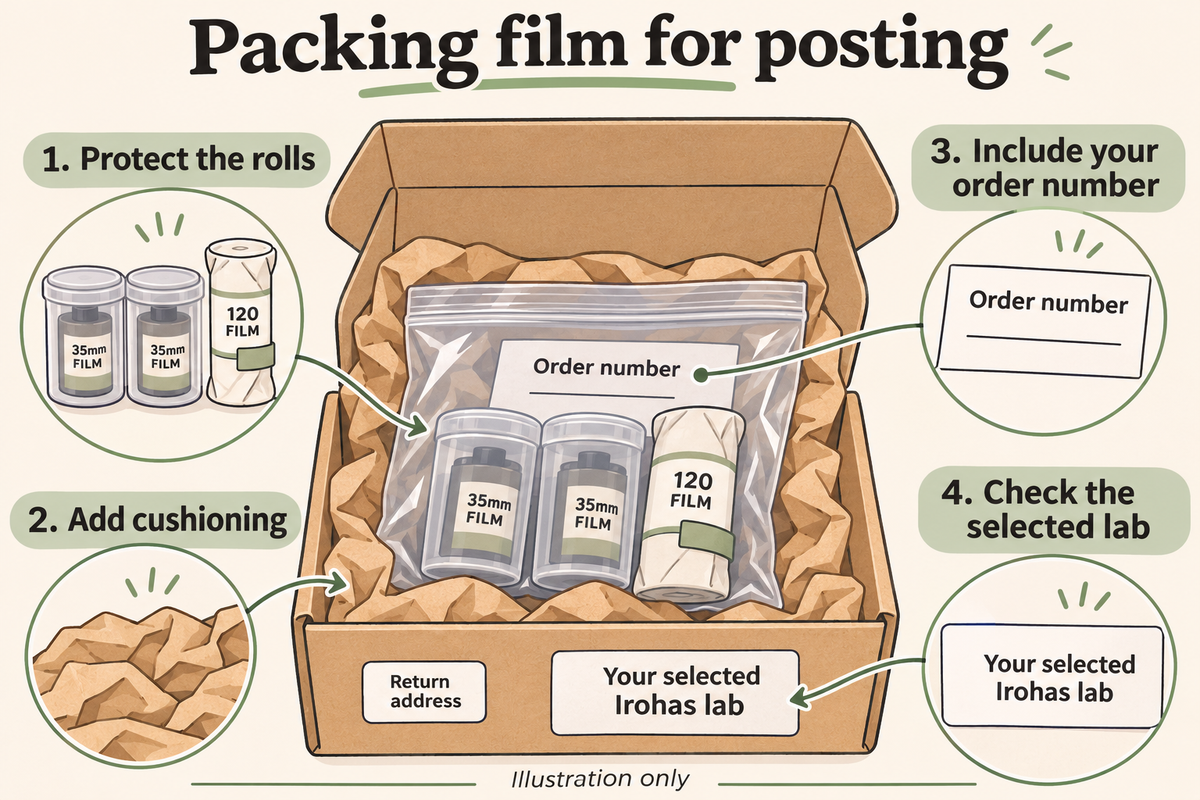
Pack and post your film in five steps
- Create the order. Choose Melbourne, Sydney or Perth in the form, select the required services, and save your order number and packing list.
- Protect the rolls. Leave 35mm film inside its rewound cassette. Keep finished 120 rolls tightly wound in their backing paper and secure the sealing tab. Do not unroll exposed film. For a disposable camera, send the whole camera without opening it.
- Add cushioning. Use a rigid box for several rolls, 120 spools or disposable cameras. Fill empty space so nothing moves, without squeezing the rolls. A sealable bag adds moisture protection but does not prevent heat damage.
- Include the order reference. Put the packing list inside. If you cannot print it, write the order number on the parcel. Add your return address and use the receiving address for the lab you selected.
- Seal and lodge the parcel. Choose a tracked service, keep the receipt and save the tracking number alongside your order reference. Check the carrier’s current conditions and delivery estimate.

Illustration only. Include the packing list; if you cannot print it, write your order number on the parcel. Address labels shown here are placeholders.
Packing details for 35mm, 120 and disposable cameras
For 35mm film, the cassette protects the film from light once it has been rewound correctly. A plastic canister adds useful physical protection inside the parcel, but cushioning and a suitable outer container still matter. If a leader remains visible or you are unsure whether a camera has rewound, follow its instructions or contact the lab rather than pulling film out to inspect it.
For 120 film, keep the exposed roll tight in its backing paper and secure the sealing tab. Choose packaging that supports the roll without squeezing the spool. Loose backing paper is a different situation from a normal finished roll: keep it protected from light and ask the lab for advice before trying to rewrap or inspect it. A sealable bag provides another moisture barrier, not a substitute for the roll’s light protection.
A disposable camera needs room for the whole body and enough cushioning to stop it pressing against other items. Leave film removal to the lab. For a parcel containing several formats, group and cushion the items so the heavier camera cannot move against the rolls. Before sealing the box, gently check for movement. Add more suitable void fill if necessary, without packing so tightly that the contents are distorted.
How to identify a mixed order clearly
An order can contain more than one film stock or processing request. Keep the relationship between each physical roll and its requested service clear. When the canister still carries its original label, leave it readable. If you add an identifying note or label, place it on the protective container or accompanying paperwork, not on the exposed film itself.
For a mixed parcel, a short list can make the contents easier to check: the stock or format, how many rolls of each you are sending, and which service you requested. Keep that list consistent with the order form. You do not need to invent a new order number for every canister; use the reference from the submitted order and ask the lab if a particular request needs more explanation.
Confirm specialist instructions before posting rather than relying on an ambiguous handwritten phrase. If you want TIFF files, Dev only, an uncut return or selected-frame scanning, make the intended service clear. Push or pull requests also need to match the processes and limits the lab offers. At Irohas, the published push/pull option is for black & white and E-6 up to one stop in either direction; it is not a general promise for every film type.
Which Irohas address should I use?
Use the address for the lab selected in your order. Before lodging the parcel, compare the label with the current lab addresses on our mail-in page. Keep your return address clearly separate from the receiving address.
Melbourne
Irohas Photo
GL, 15 McKillop Street
Melbourne VIC 3000
Australia
Sydney
Irohas Photo
Basement, 398–402 Sussex Street
Haymarket NSW 2000
Australia
Perth
Irohas Photo
Shop 202, Trinity Arcade
72 St Georges Terrace
Perth WA 6000
Australia
What happens after the film arrives?
We receive and check your rolls, then send a payment link. For orders with scanning, we email the download link once processing is complete and payment is confirmed. Our developing and scanning overview explains the service options.
Allow time for both transit and lab processing. Estimates vary by film type and receiving lab, so check processing turnaround before posting. Express Post speeds up the postal service, not the lab queue; any RUSH request must be agreed with the lab.

Developed film is inspected as part of the lab workflow; the postal and processing stages are separate.
If you want the negatives returned, arrange the return-postage option with your selected lab. It is separate from processing. Keep your originals and back up the downloaded files rather than relying on the download link as permanent storage.
Planning postage around a deadline
Work backwards from the date you need the photographs. Allow time for postal transit, receiving and checking the rolls, payment, and lab processing and scanning. We send a payment link after receiving and checking your film; the download link follows once processing is complete and payment is confirmed. A postal delivery estimate covers transit, not the complete time until your scans arrive.
The lab’s stated timings are business-day estimates and vary by location and process. Same-day C-41 is subject to the receiving lab’s availability and the published cut-off, rather than an automatic promise attached to every tracked delivery. Black & white, ECN-2 and E-6 have their own estimates. If the photographs are needed for a client, event or print booking, confirm the proposed timing with the lab before posting.
Choose a postal service whose conditions and delivery estimate suit your needs, then keep both the tracking receipt and order reference. Express Post and a lab RUSH request are separate choices. If transit is delayed, use the carrier’s tracking process and tell the receiving lab which order is involved. Do not assume that a parcel sent to the wrong location will be transferred within your deadline; contact the lab to clarify the next step.
Questions before you post
What if I forget the packing list or order number?
Contact the receiving lab with your name, order details and tracking number as soon as you notice. A name alone can be ambiguous, so provide the order reference if you can find it. Have the existing order details ready when contacting us.
Can I use a padded mailer?
A well-padded mailer may suit a small order, but it offers less crush protection than a rigid box. Choose a box for multiple rolls, fragile 120 spools or a disposable camera. Make sure nothing rattles inside.
What if a 120 roll is loose or damaged?
Keep it protected from light and contact the lab before posting. Do not peel back the backing paper or try to inspect the frames. Describe the condition so the lab can advise on the next step.
How do I follow the parcel?
Use the carrier’s website or app and keep the lodgement receipt. Tracking does not always show an exact location at every moment. If delivery is delayed, contact the carrier and keep the lab informed with the same order reference.
Receiving your scans and arranging negative returns
For a scanning order, the download email is the start of your own file-keeping workflow. Download the files while the link is available, check that you can open them, and save an independent backup. A photograph stored only in an email link is not yet a dependable archive. Keep the original delivered files before making smaller sharing copies or edits.
Our published retention period for digital scans is 60 days. Negatives are kept for 30 days after completion unless otherwise arranged. Those are different items with different retention periods, so saving the digital files does not organise collection of the physical film. Keep the order reference available and contact your selected lab about collection or return postage within the relevant period.
If you want the negatives posted back, confirm the return option, address and cost separately. Do not assume that the outbound postage you paid covers a return parcel, or that every order automatically includes physical prints. For Dev only, there are no digital scans in the service, so your next step is arranging the negatives rather than waiting for a scan download. Tell the lab if the return arrangement is important to your order before sending the film.
Ready to send your next roll?
Create your mail-in order, match the lab and address, and keep the packing list and tracking details together. For help choosing the service first, check our prices and extras or read our C-41 process guide. Pack with care, then let the roll continue its journey.


